West Sand Pit: Right Item Turn Around Collection (Hard)
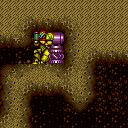

Collecting the right side item is possible by aligning Samus on the closest pixel to the item while facing left, and then performing a turnaround towards the right. This can be achieved with a Morph turnaround, an X-Ray turnaround, or a small number of turnaround aim cancels.
Strats ()
From: 6
Junction Between Items
To: 4
Top Left - Right Item


Roll into the pedestal and press left for either 1 or 2 frames exactly, this will turn Samus around without moving a pixel, unmorph and press right to collect the item. Requires: {"notable": "Right Item Turn Around Collection"},
"canMorphTurnaround" |
From: 6
Junction Between Items
To: 4
Top Left - Right Item
Facing away from the item, hold angle up, as the angle button is released tap right to wiggle slightly to the right, repeat a few times until the item is collected. Requires: {"notable": "Right Item Turn Around Collection"},
"canTurnaroundAimCancel" |
|


Perform an X-Ray Standup next to the pedestal item. To collect the item, either face away from it and spin jump into it, or while facing the item, jump, aim down and press forward. Requires: {"notable": "Right Item Turn Around Collection"},
"canXRayStandUp" |
From: 6
Junction Between Items
To: 4
Top Left - Right Item
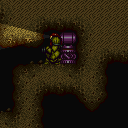

Facing the item, activate X-Ray and face left, release X-Ray and shortly after press right to collect the item. Requires: {"notable": "Right Item Turn Around Collection"},
"canXRayTurnaround" |